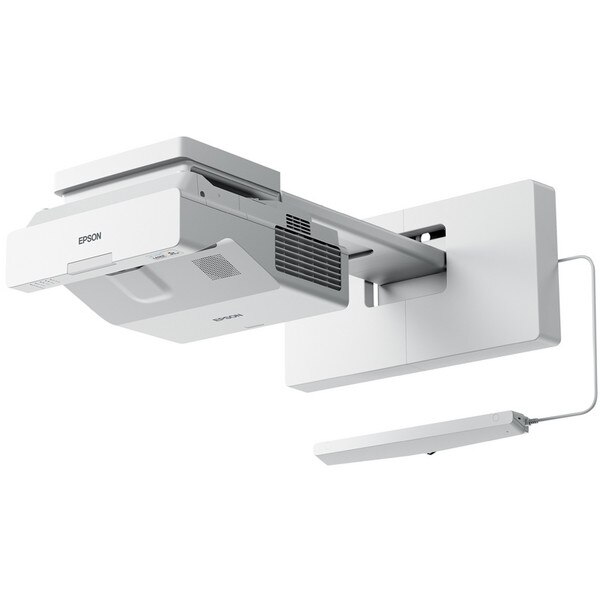
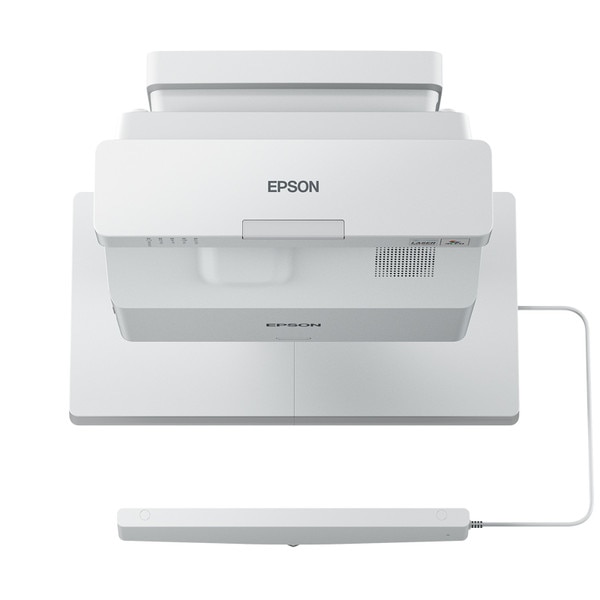
Epson EB-735Fi 3600lm 1080p Interactive Ultra Short Throw 3LCD Laser Projector

SKU: EB-735Fi
$4,299.00
Location Availability
Sydney Call For Availability
Melbourne Call For Availability

Details

Ultra Short Throw Projectors

Ultra Short Throw Projectors

HD interactive display for bright and engaging classrooms

HD interactive display for bright and engaging classrooms

3LCD Technology

All Epson projectors are based on 3-chip LCD technology for amazing colour, incredible detail and solid reliability. 3LCD's 3-chip architecture dedicates an entire chip to process each primary colour – red, green and blue, continuously. Unlike single-chip technology that delivers colour sequentially, you get full-time colour. The result is vibrant, realistic images and video all delivered with 3LCD’s true-to-life colour.

BASIC FUNCTIONS

Up to 3x Brighter Colours with Epson Projectors

Epson projectors use 3LCD Engines that have no colour wheel with a white segment and therefore don't force a trade-off between white and colour brightness. In fact, Epson projectors have up to 3x Brighter Colours than their leading competitive 1-chip DLP projectors*. If you are looking for business and education projectors or 720p home entertainment projectors, know that choosing Epson projectors means up to 3x brighter colours. If you are looking for 1080p home entertainment projectors, you consistently get 2x and up to 3x Brighter Colours than competitor 1-chip DLP projectors*. All Epson projectors list both White Brightness and Colour Brightness specifications, and all have high Colour Brightness.

3LCD Technology

All Epson projectors are based on 3-chip LCD technology for amazing colour, incredible detail and solid reliability. 3LCD's 3-chip architecture dedicates an entire chip to process each primary colour – red, green and blue, continuously. Unlike single-chip technology that delivers colour sequentially, you get full-time colour. The result is vibrant, realistic images and video all delivered with 3LCD’s true-to-life colour.

Laser Light Source

Experience astonishing quality and reliability with Epson’s laser light source technology. The newly designed laser light source and advanced electrostatic filter offers fit and forget reliability to keep maintenance to a minimum. Additionally, the laser light source is highly reliable, eliminating worry of the light burning out during important presentations.

Up to 3x Brighter Colours with Epson Projectors*

Epson projectors use 3LCD Engines that have no colour wheel with a white segment and therefore don't force a trade-off between white and colour brightness. In fact, Epson projectors have up to 3x Brighter Colours than their leading competitive 1-chip DLP projectors*. If you are looking for business and education projectors or 720p home entertainment projectors, know that choosing Epson projectors means up to 3x brighter colours. If you are looking for 1080p home entertainment projectors, you consistently get 2x and up to 3x Brighter Colours than competitor 1-chip DLP projectors*. All Epson projectors list both White Brightness and Colour Brightness specifications, and all have high Colour Brightness. *Colour brightness(colour light output) in brightest mode, measured by a third-party lab in accordance with IDMS 15.4. Colour brightness will vary depending on usage conditions. Top-selling Epson 3LCD projectors versus top-selling 1-chip DLP projectors based on NPD sales data for May 2017 – April 2018.

Big Screen

While conventional whiteboards and panels are limited to a pre-determined height and width, UST projectors have no such constraints. Set the size of the interactive area to fit the available space in your classroom.

Laser Light Source

Experience astonishing quality and reliability with Epson’s laser light source technology. The newly designed laser light source and advanced electrostatic filter offers fit and forget reliability to keep maintenance to a minimum. Additionally, the laser light source is highly reliable, eliminating worry of the light burning out during important presentations.

Ultra Short Throw

An ultra-short-throw design eliminates many of the common problems of interactive panel, such as eye glare. With an incredibly efficient throw ratio, this model allows you to project extra-large interactive images up to 100" in 16:9 and 110” in a 16:6 aspect ratio.

Full HD Resolution

Enjoy images in Full HD resolution and crisp, sharp text without any distortion. Easily read the fine print in applications such as Excel and Word. With the addition of super resolution and detail enhancement processing, images are near cinema quality.

Big Screen

While conventional whiteboards and panels are limited to a pre-determined height and width, UST projectors have no such constraints. Set the size of the interactive area to fit the available space in your classroom.

Ultra Short Throw

An ultra-short-throw design eliminates many of the common problems of interactive panel, such as eye glare. With an incredibly efficient throw ratio, this model allows you to project extra-large interactive images up to 100" in 16:9 and 110” in a 16:6 aspect ratio.

Home Screen

Get up and running in a snap with an intuitive, user-friendly home screen. Select the content source and easily access frequently-used functions such as the whiteboard tool, screen sharing and more.

Epson iProjection App

Wirelessly display content from your iOS or Android mobile devices as well as PCs, including Chromebook with the free Epson iProjection App*.

Full HD Resolution

Enjoy images in Full HD resolution and crisp, sharp text without any distortion. Easily read the fine print in applications such as Excel and Word. With the addition of super resolution and detail enhancement processing, images are near cinema quality.

Home Screen

Get up and running in a snap with an intuitive, user-friendly home screen. Select the content source and easily access frequently-used functions such as the whiteboard tool, screen sharing and more.

Image Sharing

Capture projected images and share them with wirelessly connected devices using the Epson iProjection App.

Moderator Function

Use the moderator function in the Epson iProjection App** to select a single moderator. Only the moderator can control the projected content.

EASY WIRELESS CONNECTION

Epson iProjection App

Wirelessly display content from your iOS or Android mobile devices as well as PCs, including Chromebook with the free Epson iProjection App*. *To use Epson iProjection, the projector must be configured on a network. Epson projectors can be networked either through the Ethernet port on the projector (check model specifications for availability) or via a wireless connection.

Miracast

Sharing information in the classroom has been made easier with Mircast*. Teachers can project their laptop or tablet screens without a cable connection and ensure high-resolution content can be viewed effortlessly

Instant Information Sharing

Whiteboard mode allows you to output the meeting results on-site in the user’s preferred format. Reduce significant time to perform tasks such as saving classroom notes to PDF (on USB memory, Network), sending email, printing, and making class materials has been shortened considerably. You can also reuse and edit data again from a previous whiteboard session that was saved to a USB memory or server.

Image Sharing

Capture projected images and share them with wirelessly connected devices using the Epson iProjection App.

Moderator Function

Use the moderator function in the Epson iProjection App** to select a single moderator. Only the moderator can control the projected content. **All the devices need to be wirelessly connected to the projector with Epson iProjection App. Moderator control is only available on Windows, macOS, iOS and Android devices.

Share Notes Via Email

Share lecture notes and contents directly from the EB-735Fi via email with up to 50 participants. Connect your projector to an active directory server and you can search names and email address.

Easy to Save Notes to a PC

Simply connect to a PC via USB cable and you can save and upload any study material and whiteboard annotations directly to your PC or use optional USB wall control pad.

Miracast

Sharing information in the classroom has been made easier with Mircast*. Teachers can project their laptop or tablet screens without a cable connection and ensure high-resolution content can be viewed effortlessly *Laptops or mobile devices must support Miracast.

EASY COLLABORATION

Digital made easy, without a PC or software

Transform traditional dry-erase whiteboards, plain walls and even tables into digital surfaces. Just pick up the pen and start writing. Or, use your finger — touch-enabled interactivity — to draw, share and interact with intuitive and familiar gestures. Add pages, or insert shapes and images. When you’re done, share your notes via the email, print or save functions — all without a computer.

Large screen for video conferencing

You no longer need a flat-panel display for your videoconferencing needs. Connect your videoconferencing system to the EB-735Fi and display an image as large as 100 inches. Simultaneously display your additional content such as a webpage or presentation on one side of screen and videoconference, using the Split Screen feature.

Instant Information Sharing

Whiteboard mode allows you to output the meeting results on-site in the user’s preferred format. Reduce significant time to perform tasks such as saving classroom notes to PDF (on USB memory, Network), sending email, printing, and making class materials has been shortened considerably. You can also reuse and edit data again from a previous whiteboard session that was saved to a USB memory or server.

Share Notes Via Email

Share lecture notes and contents directly from the EB-735Fi via email with up to 50 participants. Connect your projector to an active directory server and you can search names and email address.

Flexible display options and sizes

Deliver impactful sessions with a multi-touch display of up to 100 inches (16:9 aspect) in pen and finger interactive mode. Additionally, the EB-735Fi is capable of displaying an ultra-wide 16:6 aspect image* that is 110 inches.

Multi-PC Projection

Epson’s Multi-PC utility with Moderator device management software allows you to simultaneously display up to four devices on the screen over network (wired or wireless), with even more users connected to the same interactive display on Standby Mode. The moderator can drag and drop participants into or out of the four quadrants and control which device screens to display. Encourage and control collaboration; it’s perfect for comparing ideas and content side by side

Easy to Save Notes to a PC

Simply connect to a PC via USB cable and you can save and upload any study material and whiteboard annotations directly to your PC or use optional USB wall control pad.

Digital made easy, without a PC or software

Transform traditional dry-erase whiteboards, plain walls and even tables into digital surfaces. Just pick up the pen and start writing. Or, use your finger — touch-enabled interactivity — to draw, share and interact with intuitive and familiar gestures. Add pages, or insert shapes and images. When you’re done, share your notes via the email, print or save functions — all without a computer.

Finger Touch

Use your finger* to write or draw directly on to projected images.

Real time drawing and PC operation

Interact with your PC automatically by connecting a USB cable from the projector to the PC. This enables PC control using the included interactive pen and even with your finger (enable it with optional FTU).

Large screen for video conferencing

You no longer need a flat-panel display for your videoconferencing needs. Connect your videoconferencing system to the EB-735Fi and display an image as large as 100 inches. Simultaneously display your additional content such as a webpage or presentation on one side of screen and videoconference, using the Split Screen feature.

Flexible display options and sizes

Deliver impactful sessions with a multi-touch display of up to 100 inches (16:9 aspect) in pen and finger interactive mode. Additionally, the EB-735Fi is capable of displaying an ultra-wide 16:6 aspect image* that is 110 inches.

All on screen items can be rearranged and edited freely

Any image on the screen can be resized, moved and captured as if it were an object. Even if there is no writing space on the screen, written contents can be shrunk down to make room for new annotations. Simply turn off touch function when presentation only mode is required.

Whiteboard function

There is no need to worry about running out of space when writing meeting notes or importing information on the Whiteboard with up to 20 pages available at one time.

Multi-PC Projection

Epson’s Multi-PC utility with Moderator device management software allows you to simultaneously display up to four devices on the screen over network (wired or wireless), with even more users connected to the same interactive display on Standby Mode. The moderator can drag and drop participants into or out of the four quadrants and control which device screens to display. Encourage and control collaboration; it’s perfect for comparing ideas and content side by side

INTERACTIVE FUNCTIONS

Document camera control

An Epson document camera can be controlled* from the toolbar on the screen. Adjust image zoom and focus. Save** the image or the recorded video* to an SD card as an image or movie file.

Control box - ELPCB03

Pair up the EB-735Fi with the ELPCB03 to easily turn power on/off, freely control AV mute and speaker volume, and select a device you want to project to a screen.

Finger Touch

Use your finger* to write or draw directly on to projected images. *Laptops or mobile devices must support Miracast.

Real time drawing and PC operation

Interact with your PC automatically by connecting a USB cable from the projector to the PC. This enables PC control using the included interactive pen and even with your finger (enable it with optional FTU).

New wall mount - ELPMB62

The ELPMB62 wall mount can save time and cost by simplifying the installation process of the EB-735Fi. Designed for image stability and easy adjustment, it includes automated processes for screen and interactivity set up, ensuring the EB-735Fi can be up and running within a matter of moments. The ELPMB62 wall mount is ready to integrate with a Mini PC inside the base plate, enabling powerful yet simple setup.

Finger Touch Unit Mount - ELPMB63

Wall plate for new optional finger touch unit is available for nonmagnetic surfaces.

All on screen items can be rearranged and edited freely

Any image on the screen can be resized, moved and captured as if it were an object. Even if there is no writing space on the screen, written contents can be shrunk down to make room for new annotations. Simply turn off touch function when presentation only mode is required.

Whiteboard function

There is no need to worry about running out of space when writing meeting notes or importing information on the Whiteboard with up to 20 pages available at one time.

Epson Projector Management software

Manage multiple projectors with one device from a remote site. Epson Projector Management software allows you to check the status of multiple projectors through the network. You can also turn projectors on/off or set them to A/V mute simply by pressing the icon on this software. You can also schedule and execute firmware updates to connected projectors.

Document camera control

An Epson document camera can be controlled* from the toolbar on the screen. Adjust image zoom and focus. Save** the image or the recorded video* to an SD card as an image or movie file. *available on ELPDC07, ELPDC13 and ELPDC21 **available on ELPDC13 and ELPDC21 only

EASY MANAGEMENT

Control box - ELPCB03

Pair up the EB-735Fi with the ELPCB03 to easily turn power on/off, freely control AV mute and speaker volume, and select a device you want to project to a screen.

New wall mount - ELPMB62

The ELPMB62 wall mount can save time and cost by simplifying the installation process of the EB-735Fi. Designed for image stability and easy adjustment, it includes automated processes for screen and interactivity set up, ensuring the EB-735Fi can be up and running within a matter of moments. The ELPMB62 wall mount is ready to integrate with a Mini PC inside the base plate, enabling powerful yet simple setup.

Finger Touch Unit Mount - ELPMB63

Wall plate for new optional finger touch unit is available for nonmagnetic surfaces.

Epson Projector Management software

Manage multiple projectors with one device from a remote site. Epson Projector Management software allows you to check the status of multiple projectors through the network. You can also turn projectors on/off or set them to A/V mute simply by pressing the icon on this software. You can also schedule and execute firmware updates to connected projectors.

Specifications

PRODUCT
PRODUCT
Product
PRODUCT NAMEEB-735Fi
Product NameEB-735Fi
PRODUCT CODEV11H997553
Product CodeV11H997553
TECHNOLOGY
TECHNOLOGY
Projection SystemRGB liquid crystal shutter projection system
LCD Panel0.61-inch (C2fine)
Pixel Number2,073,600 dots (1920 x 1080)
Resolution1080p
Resolution1080p
OPTICAL
OPTICAL
Zoom1 – 1.35 (Digital)
Screen Size65" to 100" [37.2 cm to 58.3 cm] @16:9
60" to 110" [36.9 cm to 69.2 cm] @16:6
Screen Size65" to 100" [37.2 cm to 58.3 cm] @16:9
60" to 110" [36.9 cm to 69.2 cm] @16:6
Projection Distance76" screen at 44.3cm
Throw Ratio0.26 (Zoom:Wide)
0.36 (Zoom:Tele)
Throw Ratio0.26 (Zoom:Wide)
0.36 (Zoom:Tele)
Projection Lens F Number1.6
Projection Lens Focal Length3.7 mm
Focus MethodManual
Focus MethodManual
Lens ShiftN / A
Lens ShiftN / A
IMAGE
IMAGE
Colour Light Output3,600 lumens
White Light Output3,600 lumens
Native Aspect Ratio16:09
Native Aspect Ratio0.672916667
Contrast RatioOver 2,500,000:1
Light SourceLaser
Light SourceLaser
Colour ReproductionUp to 1.07 billion colours
Colour Processing10 bit
Keystone CorrectionVertical: -3 to +3 degrees
Horizontal: -3 to +3 degrees
Keystone CorrectionVertical: -3 to +3 degrees
Horizontal: -3 to +3 degrees
Quick CornerYes
Quick CornerYes
Auto SetupYes
Auto SetupYes
Refresh Rate192 Hz / 240 Hz
CONNECTIVITY
CONNECTIVITY
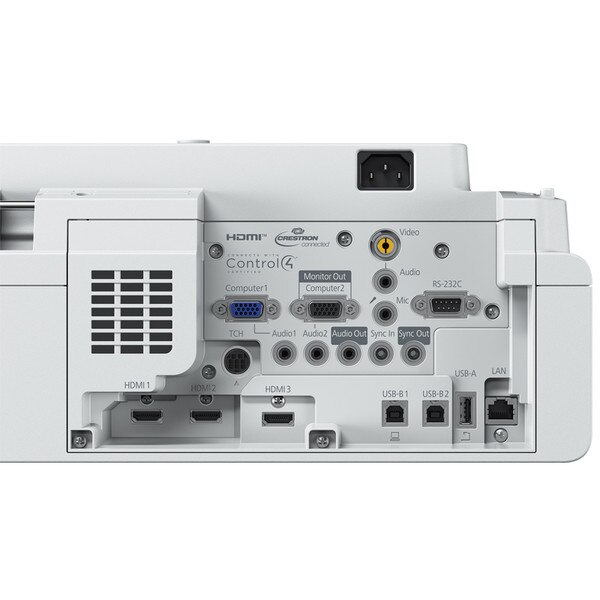
Video I/O - Input2x RGB D-sub 15pin
1x RCA Composite
Video I/O - Input2x RGB D-sub 15pin
1x RCA Composite
Video I/O - Output1x RGB D-sub 15pin (shared)
Digital Input3x HDMI
Digital OutputN/A
Digital OutputN/A
Audio I/O - Input3x Stereo mini
1 x Mic-In Stereo Mini
Audio I/O - Input3x Stereo mini
1 x Mic-In Stereo Mini
Audio I/O - Output1x Stereo mini
Control I/O1 x RS232C (D-sub 9 pin)
Interactive sync Stereo Mini - 1 x In, 1 x Out
Touch Unit Control - Mini DIN 8pin
Control I/O1 x RS232C (D-sub 9 pin)
Interactive sync Stereo Mini - 1 x In, 1 x Out
Touch Unit Control - Mini DIN 8pin
USB I/O1 x Type A (for USB Memory, USB Document Camera)
2 x Type B (Firmware update, Copy OSD Settings)
USB I/O1 x Type A (for USB Memory, USB Document Camera)
2 x Type B (Firmware update, Copy OSD Settings)
Network I/O:1 x RJ45 (100Mbps) Wired LAN
Touch InteractiveMin DIN 8pin
Wireless ConnectivityBuilt-in Miracast and Built-in Wireless
Optional Wireless LAN unit (ELPAP11)*
*With an optional ELPAP11, it is possible to use the Miracast and Wi-Fi function simultaneously (both simple AP mode and manual mode).
Wireless ConnectivityBuilt-in Miracast and Built-in Wireless
Speaker Output1 x 16 W Stereo
ADVANCED FEATURES
ADVANCED FEATURES
Epson Projection Management SoftwareYes
Partner StandardsCrestron Integrated Partner, Crestron RoomView, Extron IP Link, Extron XTP, AMX Device Discovery, Control4 Simple Device Discovery Protocol
Easy Interactive ToolsVer 5.00 (Windows)
Ver 5.01 (Mac OS)
Easy Interactive ToolsVer 5.00 (Windows)
Ver 5.01 (Mac OS)
PC Interactive ToolMultiple pen: Yes (up to 2) with Easy Interactive Tools
Finger touch support: Optional (up to 6 fingers)
PC Interactive ToolMultiple pen: Yes (up to 2) with Easy Interactive Tools
Finger touch support: Optional (up to 6 fingers)
PC Free Annotation ToolMultiple pen support: Yes (up to 2)
Finger touch support: Optional (Up to 6)
Whiteboard function (Pen up to 2, optional: up to 6)
Projector operation
PC Free Annotation ToolMultiple pen support: Yes (up to 2)
Finger touch support: Optional (Up to 6)
Whiteboard function (Pen up to 2, optional: up to 6)
Projector operation
Firmware UpdateNetwork via LAN cable,
USB A via USB thumb drive,
USB B via USB cable
Firmware UpdateNetwork via LAN cable,
USB A via USB thumb drive,
USB B via USB cable
Copy OSD settingsNetwork via LAN cable,
USB A via USB thumb drive,
USB B via USB cable
Copy OSD settingsNetwork via LAN cable,
USB A via USB thumb drive,
USB B via USB cable
Wireless LAN SecurityWPA2/WPA3-PSK (Personal),
WPA2/WPA3-EAP (Enterprise)
Wireless LAN SecurityWPA2/WPA3-PSK (Personal),
WPA2/WPA3-EAP (Enterprise)
Instant OffYes
Instant OffYes
Direct Power OnYes
Direct Power OnYes
Auto Power OnYes
Auto Power OnYes
SecurityPadlock & Security Cable Hole
Kensington® lock provision
Wireless LAN Unit Lock
Password protection
SecurityPadlock & Security Cable Hole
Kensington® lock provision
Wireless LAN Unit Lock
Password protection
Colour ModesDynamic, Presentation, Cinema, sRGB, BlackBoard
Wall MountOptional (ELPMB62)
GENERAL
GENERAL
Dimensions (excl feet) WxDxH395 x 356 x 133 mm
Weight5.8kg
Weight5.8kg
Projector Warranty3 Years
Power Consumption: Projector on255 W
Power Consumption: Standby2 W
Noise Level (Normal / Eco)36 / 26 dB
WHAT'S IN THE BOX
WHAT'S IN THE BOX
Main UnitEB-735Fi Projector
Power Cable1.8 m
Power Cable1.8 m
USB Cable5 m
USB Cable5 m
Remote ControlYes
Remote ControlYes
Battery for Remote Control2 x AA
Easy Interactive Pen2 Pens
Battery for Easy Interactive Pen2 x AA
Pen StandYes
Pen StandYes
Pen tip (Soft)x4
Pen tip (Soft)x4
Pen tip (Hard)x2
Pen tip (Hard)x2
Corner markers for auto setupYes
PRODUCT OPTIONS
PRODUCT OPTIONS
V13H134A60Air Filter – ELPAF60
V12HA06A06Projector wall mount – ELPMB62
V12H007A24Finger Touch Unit (FTU) – ELPFT01
V12HA05A09FTU wall mount - ELPMB63
V12H773010Pen – ELPPN05A
V12H774010Pen - ELPPN05B
V12H775010Hard Pen Tip – ELPPS03
V12H776010Soft Pen Tip – ELPPS04
V12H467053External speakers ELPSP02
V12H731P01Document Camera ELPDC21
V12H005A01Wireless LAN Unit ELPAP11
V12H003B23Projector ceiling mount - ELPMB23

Ask a Question

Product Enquiry


Fill out the form below to get more information on this item and our friendly team will get back to you shortly.